Your PDF,
Converted to editable text, saved to OneNote.

Upload your e-Ink notes, PDFs, Word Docs or images. Now all your notes can be converted to editable text.

Click to upload files

DOC, JPG, PNG, PDF supported
How It Works

Transform your handwritten notes into editable text in just three simple steps

1

Upload Your Notes

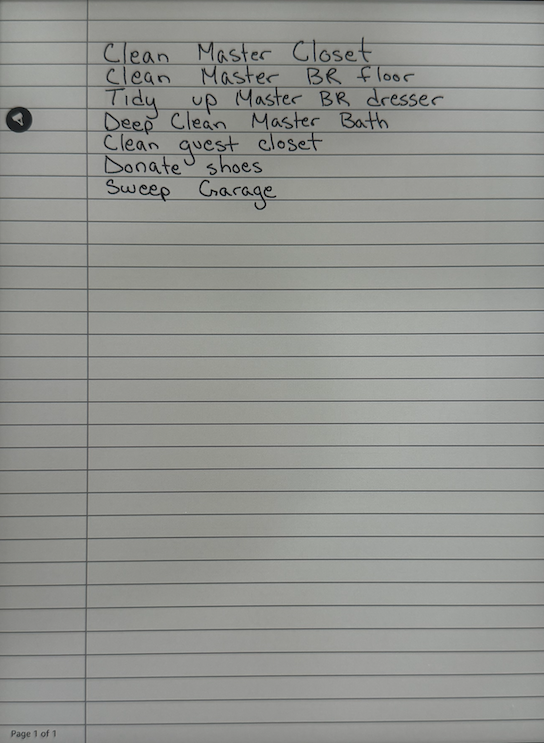
Take a photo of your handwritten notes, or upload PDFs, Word Docs, or e-Ink exports

Handwritten notes on lined paper showing a to-do list
2

AI Converts to Text

Our AI analyzes your content and converts it to perfectly formatted, editable text

All-In-OneNote
Files (1)Clear All

Spring Cleaning-To Do.pdf

Ready to Review

Spring Cleaning-To Do.pdf

Clean Master Closet

Clean Master BR floor

Tidy up Master BR dresser

Deep Clean Master Bath

Clean guest closet

Donate shoes

Sweep Garage

3

Save to OneNote

Export directly to OneNote with one click, keeping all your notes organized

Saved to OneNote!

"Spring Cleaning-To Do" has been created in your default Quick Notes section.

Open in OneNote Web
Save another

Try it free — your first 3 conversions are on us!

Simple, Transparent Pricing

Unlock the full power of your notes.

Starter

Free

Perfect for testing the accuracy.

$0
  • 3 Free High-Res Conversions
  • AI-Powered OCR
  • PDF & Image Support
Current Plan
MOST POPULAR

Monthly Pro

For serious note-takers.

$5.99/mo
  • Unlimited Conversions
  • OneNote Integration
  • Batch Processing
  • Cancel Anytime

Lifetime Pro

Pay once, use forever.

$99/once
  • Everything in Pro
  • No Monthly Fees
  • Lifetime Access
  • Future Updates Included

Secure payment powered by Stripe. Cancel anytime for monthly plans.